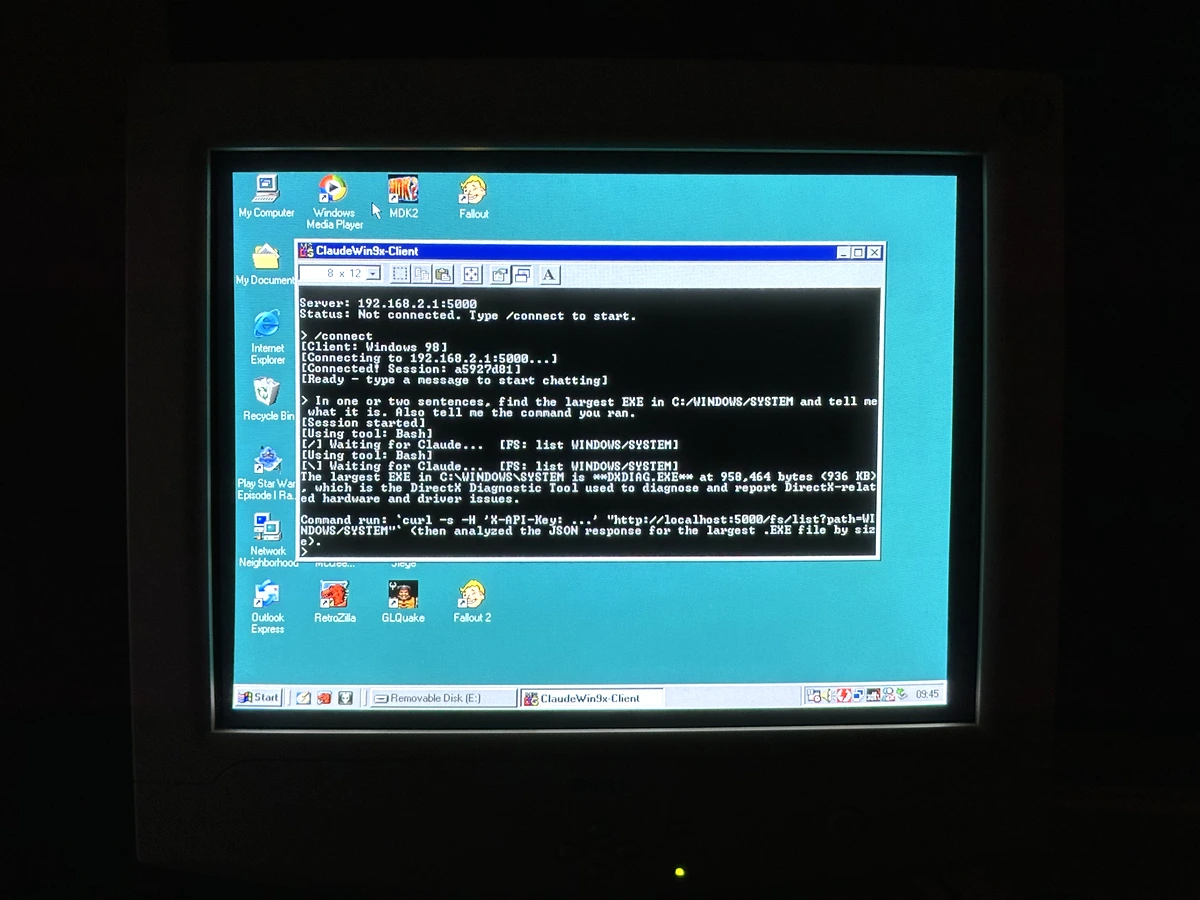
TL;DR: I built a server that lets Claude Code CLI run on Windows 95/98/NT4/2000/XP. The server runs on a modern machine built on .NET 10, the client runs on Win9x written in C99, they talk over HTTP and TCP. Code: github.com/ryandeering/claudewin9x
“You’ve committed computer sacrilege,” my friend tells me over our traditional Christmas Eve drinks. I’m showing him a video on my phone of my old computer, terminal window, text scrolling, commands firing. Only thing is, this was running on Windows 98.
This is a stupid idea. But it’d been rattling around in my head since work got my team Claude subscriptions, every time I passed by my Pentium III machine. Claude Code is Anthropic’s CLI that writes code, runs commands, and keeps going until it’s done… and I couldn’t stop thinking about how badly it didn’t belong anywhere near a Windows 98 install.
Which, unsurprisingly, it cannot run on.
It’s just a program that reads from stdin and writes to stdout. It doesn’t care where the input comes from. So what if I ran Claude on a modern computer and piped the conversation to the old one over the network?
Win98 -HTTP-► Server -stdin/stdout-► Claude Code CLIThe server spawns Claude, translates JSON output into plain text, and serves it over HTTP. The Win98 machine polls for responses. Stupid, but it should work.
Pipe In, Pipe Out
Claude Code is a terminal application. You type, it responds. Anthropic built in a programmatic mode though:
claude \
  --input-format stream-json \
  --output-format stream-json \
  --print \
  --verbose \
  --dangerously-skip-permissions \
--append-system-prompt "{SYSTEM_PROMPT}"| Flag | Purpose |
|---|---|
--input-format stream-json | Accept JSON messages on stdin |
--output-format stream-json | Emit JSON responses on stdout |
--print | Non-interactive mode, no terminal UI |
--verbose | Verbose logging for debugging |
--dangerously-skip-permissions | Skip the Y/N prompts (we handle those ourselves on the client) |
--append-system-prompt | Inject context about the Windows environment |
With these flags, Claude becomes a controllable subprocess. The server proxies input, output, and approvals over HTTP.
The Server
I used .NET 10. I’ve had good results publishing servers as AOT on my home Raspberry Pi 5 to host projects like, funnily enough, the Windows 95 3D Maze compiled to WebAssembly. I wanted to incorporate the newest features: primary constructors, records, minimal API patterns, Native AOT compilation publishing a single ~11MB executable with no runtime dependency. The client targets an ancient msvcrt.dll. The server uses a version of .NET released in November 2025. I found that quite cute.
It’s all polling because Win9x can’t receive incoming connections through most NAT setups. Even if it could, I don’t trust such an old network stack with arbitrary inbound traffic.
The server injects about 1500-2000 tokens of context telling Claude about the environment. It specifies which Windows version it’s talking to, which paths are write-protected (please don’t delete SYSTEM32, Claude!), how to escape backslashes through multiple interpreters (we’ll get to that in a sec), when to use 8.3 filenames, and when to use bulk file transfers instead of individual writes.
The Client
I wasn’t going to subject myself to Visual Basic 6 programming. I wanted proper threaded programming for the polling as well as text input, and VB6 has no threading. I went with C99. My exposure to C standards is a bit scatter-brained: some ANSI C/C89, some C11 from porting the reverse-engineered classic Fallout games to Nintendo Switch, but nothing formal. As an aside, I was surprised when I loaded up Visual Studio 6.0 on my Win98 machine only to find it couldn’t compile the code I’d written. Microsoft didn’t support C99 until Visual Studio 2013, they pushed C++ for a very long time. That was a history lesson!
I wanted to keep dependencies light. For the client, I used cJSON. One .c file, one .h file, pure ANSI C. The whole thing compiles to a single static binary importing three DLLs: KERNEL32.dll, msvcrt.dll, WS2_32.dll. All ship with Windows 98. Windows 95 needs the WinSock 2 update and mscvrt.dll from Internet Explorer 5. You can find both easily enough online.
Welcome to DOS Hell
With HTTP working, I moved on to executing commands. Claude needs to run compilers, look at directory listings, do things. The server queues commands, the client executes them locally and sends back the output. This is where I nearly gave up.
Standard approach: _popen() to capture stdout:
FILE *pipe = _popen("dir", "r");
// read output
_pclose(pipe);
Works grand on Windows 2000 and XP. On Windows 98, the output vanishes. Sometimes you get half of it. Sometimes nothing. The pipe never closes properly.
Win9x inherits DOS semantics, and this is one of those places where it shows. When you run a program, COMMAND.COM sets up the standard file handles. stdin is the keyboard. stdout is the screen.
These aren’t abstractions by the way, these are DOS file handles pointing to devices: CON (console), PRN (printer), NUL (the void).
When you write program.exe > output.txt, COMMAND.COM opens that file, assigns it to handle 1, and runs your program. Your code writes to stdout like normal. It has no idea whether that’s going to the screen or a file. The redirection happens before your program even starts.
_popen() breaks because the C runtime tries to set up pipes for inter-process communication, but COMMAND.COM doesn’t understand what it’s being asked to do. It shuffles bytes between files and devices. It doesn’t coordinate two processes talking to each other.
NT has proper kernel-level inter-process communication. Win9x doesn’t. The function exists in the C runtime but there’s nothing underneath it. It’s a trapdoor with no floor.
Instead of pipes, use temp files:
// Run command, redirect stdout to temp file
system("command.com /c dir > C:\\TEMP\\OUTPUT.TMP");

// Read the temp file
FILE *f = fopen("C:\\TEMP\\OUTPUT.TMP", "r");
The nice thing is I don’t have to choose. The client checks the Windows version at runtime:
ver = GetVersion();
major = (DWORD)(LOBYTE(LOWORD(ver)));

if (major >= 5) {
    exit_code = execute_command_nt(cmd_copy, cmd_output, MAX_CMD_OUTPUT);
} else {
    exit_code = execute_command_9x(cmd_copy, cmd_output, MAX_CMD_OUTPUT);
}
On NT-based systems (NT4, 2000, XP), it uses _popen() with proper stderr redirection. On Win9x it falls back to temp files. Same binary, picks its path at runtime.
There’s a casualty though: on Win9x, you lose stderr. COMMAND.COM doesn’t support 2>&1. If a compiler spits out errors on stderr, you won’t see them. For a tool meant to run the likes of compilers, this hurt.
Runs On My Machine
I compiled the client, copied it to Win98, ran it, and got:
This program cannot be run in DOS mode.The executable was fine. The code was fine. It ran on my (modern)machine.
I checked the imports with objdump. All the DLLs existed on Win98. I verified I was targeting 32-bit. Tried different compiler flags. Nothing worked.
The problem was the PE subsystem version. Executables have a field in the header that specifies the minimum OS version, and my compiler was defaulting to 6.0 (Windows Vista). Win98 saw that number, decided it was too old to run this program, and gave up.
The fix is a linker flag:
-Wl,--subsystem,console:4.0 # 4.0 means "Windows 95 or later."Even with the right compiler and subsystem version, Win98 still refused to run the binary:
Entry Point Not Found

The procedure entry point _strtoui64 could not be located
in the dynamic link library msvcrt.dll.
My code doesn’t call _strtoui64. But cJSON uses strtod() for parsing JSON numbers, and older MinGW’s strtod() implementation pulls in 64-bit integer parsing functions that weren’t added to msvcrt.dll until Windows XP. The C99 equivalents (strtoll, strtoull) never made it into msvcrt.dll at all. So there I was, broken by a function I never called in a library I didn’t write. Lovely.
The fix, after some searching, was to use MinGW-w64 12.0.0 or later. In 2024, they merged a patch that provides internal implementations for i386 targets, so binaries no longer need these symbols from msvcrt.dll. The winlibs.com build with GCC 15.1.0 works out of the box. Yay!
The MinGW-w64 in Ubuntu 24.04’s apt repo (as of December 2025) is still on version 11.0.1, which doesn’t include the fix. This bit me in both my devcontainer setup and CI build.
The Great Escape
Claude runs on the server. The files live on the Win98 machine. There’s no shared filesystem, so Claude has to POST file contents to an HTTP endpoint, which the client picks up and writes locally. To make that HTTP request, Claude runs a bash command that invokes Node or Python to construct the JSON.
Yes, I built a system where an LLM talks to a shell that talks to a JavaScript runtime that talks to an HTTP server that talks to an operating system from the nineties. You can only laugh.
Something like:
node -e "const data = JSON.stringify({ path: 'test.bat', content: 'set PATH=C:\\WINDOWS' })..."That backslash passes through bash, which interprets escape sequences. Then through JavaScript, which has its own escaping. Then through JSON serialization. By the time it reaches the file, your path is C:WINDOWS. Great.
Four backslashes in the source become one in the file:
Source: \\\\ → Bash: \\ → JS: \\ → JSON: \\ → File: \Single quotes help. Wrapping the entire node -e argument in single quotes prevents bash from interpreting anything:
node -e '
const data = JSON.stringify({
  path: "test.bat",
  content: "set PATH=C:\\\\PROGRA~1\\\\MYAPP"
});
'
The system prompt explains all of this to Claude.
CRITICAL BACKSLASH ESCAPING RULES:
When using bash with node -e or python -c, backslashes pass through multiple interpreters.
For a SINGLE backslash in the output file (e.g., C:\WINDOWS), you need FOUR backslashes (\\\\).

Escaping reference:
- Source \\\\  ->  Bash \\  ->  JS/Py \\  ->  JSON serializes to \\  ->  File gets \
- Source \\    ->  Bash \   ->  eaten (WRONG!)
That’s the server side. The client has its own slash problem.
JSON and Claude both prefer forward slashes. COMMAND.COM doesn’t understand them as path separators. It thinks / starts a command switch. So dir C:/WINDOWS fails because COMMAND.COM sees C: as the command and /WINDOWS as a switch.
The client converts forward slashes to backslashes, but it has to be selective:
Slash conversion code (don't look too closely)
void path_to_backslashes(char *str)
{
    char *p = str;
    char prev = ' ';
    int in_url = 0;

    for (; *p; p++) {
        /* Detect start of URL (://) */
        if (!in_url && *p == ':' && p[1] == '/' && p[2] == '/') {
            in_url = 1;
            prev = *p;
            continue;
        }

        /* Inside URL: skip until whitespace */
        if (in_url) {
            if (*p == ' ' || *p == '\t' || *p == '\n' || *p == '\r' ||
                *p == '"' || *p == '\'') {
                in_url = 0;
            }
            prev = *p;
            continue;
        }

        if (*p == '/') {
            /* Don't convert switches: space/tab followed by /switchchar */
            if ((prev == ' ' || prev == '\t') && *(p + 1) &&
                is_switch_char(*(p + 1))) {
                prev = *p;
                continue;
            }
            *p = '\\';
        }
        prev = *p;
    }
}
It preserves:
- URLs:
http://example.com/pathstays unchanged - Command switches:
dir /w C:/WINDOWSbecomesdir /w C:\WINDOWS
> Y/N?
Claude runs on my mini PC. The files live on the Win98 machine. When Claude decides to run dir C:\WINDOWS, that needs to happen over there. The user who should approve it is sitting at the old machine, not watching the server’s terminal.
The client polls /approval/poll, displays the request, waits for Y or N. On the server side, a TaskCompletionSource blocks until the response comes back. Two minutes without a response times out and rejects. There’s a skip_permissions flag in the .ini file for when you get tired of pressing Y.
Win98 Client                Server                    Claude
     │                         │                         │
     │── GET /approval/poll ──►│                         │
     │◄── {approval_id,        │◄── tool request ────────│
     │     tool_name,          │                         │
     │     tool_input}         │                         │
     │                         │                         │
     │── POST /approval/respond│                         │
     │   {approval_id,         │                         │
     │    approved: true} ────►│                         │
     │                         │                         │
     │── GET /cmd/poll ───────►│                         │
     │◄── {cmd_id, command} ───│                         │
     │                         │                         │
     │  (executes locally)     │                         │
     │                         │                         │
     │── POST /cmd/result ────►│──── result ────────────►│
     │   {command_id, stdout,  │                         │
     │    stderr, exit_code}   │                         │
HTTP works fine for chat messages and small files. But when Claude needs to transfer dozens of files, HTTP round-trips add up.
So I added a TCP protocol for bulk file transfers on ports 5001 and 5002. I’d never done socket programming before, so that was a learning curve. The client connects, sends the filename and size, streams the bytes. Claude can zip up a whole directory on the server side and the client pulls it down in one go instead of a hundred HTTP round-trips.
It’s worth mentioning obviously: all traffic is unencrypted. Win9x has no TLS support worth speaking of, so only use this on a trusted local network.
The Result
That’s Windows 2000 in the video. I tested Windows 95, 2000, and NT4 in VMs. Windows 98 and XP got the real hardware treatment on the Pentium III with my trusty Intel N100 mini-PC running the server over ethernet.
After all that, it works. You can chat with Claude on old Windows systems, browse directories, read and write files, run commands. The full ‘agentic loop’ with a network hop in the middle.
The Win9x piping problem stings though. Losing stderr means losing compiler errors. Claude has to infer failures from missing output files instead in some of the test scenarios I observed. I did read there are third-party shells that might help, like 4DOS, but adding that as a dependency seemed beyond the initial scope.
I also want to make sure it runs properly on a 486. I built the client using Open Watcom, an open-source continuation of the Watcom compiler family used by a lot of classic DOS games. It has partial C99 support and appears to produce a 486 compatible binary, but I still need a test setup to confirm it behaves as expected.
The whole thing took about a day to get the basics working, then a few more days tidying up the code, setting up CI, and making sure my C wasn’t going to blow up anyone’s old PC. If you’re into retro computing or want to let an LLM loose on an old Windows machine, the code, client and server are all on GitHub.
The hard problems weren’t where I expected them. I figured the HTTP stack would be a nightmare, the JSON parsing a headache. The things that done my head in were the likes of a PE header field defaulting to Vista, a 64-bit integer function hiding because I had the wrong version of a compiler, and a pipe abstraction with basically nothing underneath it! Fun problems to have, far away from my usual line of work anyway.
I sent my friend the finished version a few days later. Still sacrilege, apparently. That’s alright with me. I’ve had my fun, and that’s all that matters!